
Google reviews have become one of the most powerful tools for local businesses to build trust, enhance visibility, and drive revenue. Whether you’re a small business owner or managing a larger enterprise, your online reputation can significantly impact your success. With 95% of consumers reading reviews before purchase, it’s clear that reviews are no longer optional—they’re essential.
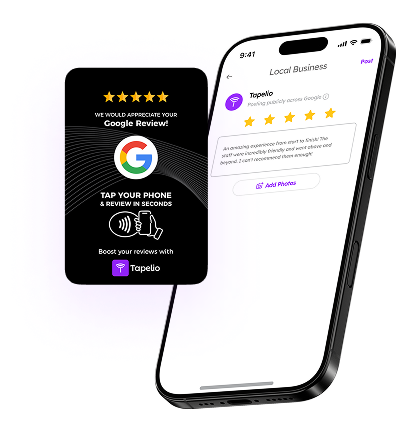
One of the easiest ways to collect more reviews effortlessly is by using tools like a Google Review Card or a Google Review Stand. These NFC-enabled solutions allow customers to leave a review with a simple tap, eliminating friction and increasing the likelihood of feedback.
This guide is your ultimate resource for understanding the importance of Google reviews, learning proven strategies to collect more of them, and discovering real-world examples of businesses that have successfully leveraged reviews to grow. From improving your local SEO rankings to building customer trust and increasing revenue, we’ll cover everything you need to know to harness the power of Google reviews in 2025.
Table of Contents
- Why Google Reviews Matter
- How to Get More Google Reviews
- Common Google Review Mistakes to Avoid
Why Google Reviews Matter
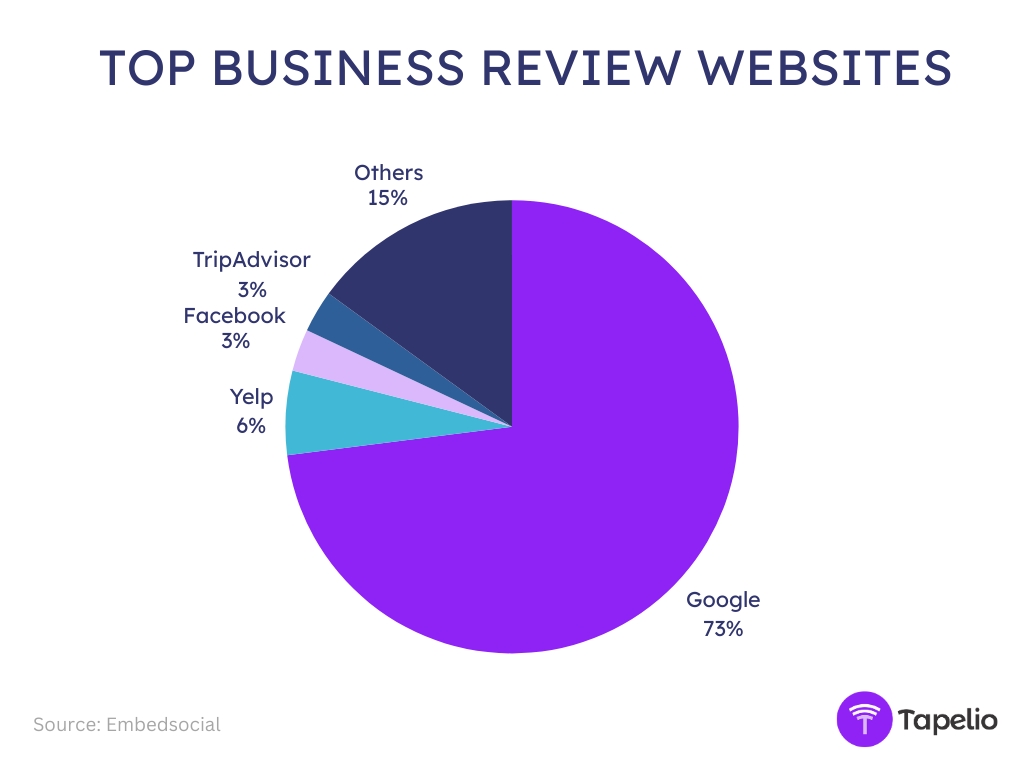
Google reviews have become a cornerstone of success for local businesses, influencing everything from search engine rankings to customer trust and revenue growth. Google reviews dominate the online review landscape, accounting for 73% of all business reviews, making them the most influential factor in building trust, improving search rankings, and attracting new customers. Google has become the go-to platform for evaluating local businesses, with 87% of consumers using it to assess businesses before making a decision—a significant jump from 63% in 2020.
Consumer Behavior and Trust
75.5% of consumers trust online reviews, emphasizing the growing reliance on peer feedback over traditional advertising. Google reviews, in particular, play a pivotal role, with 81% of people checking Google reviews before visiting a business.
The influence of reviews extends beyond just Google. 91% of customers use any form of online review before purchasing, and 87% find reviews more impactful than influencer endorsements. This shift toward user-generated content underscores the power of authentic customer feedback in shaping consumer behavior.
Revenue Impact
Businesses with more than 25 reviews earn 108% more revenue than the average. This data highlights the long-term financial benefits of accumulating a substantial number of reviews.
A practical example from StoragePug’s 2025 case study illustrates this impact: a single 5-star review led to five new rentals, each worth thousands of dollars. This real-world example demonstrates how even one positive review can drive tangible revenue growth.
Rank Higher in Google Results
Google reviews are a key factor in local search engine optimization (SEO). Google reviews have a significant impact on local visibility, influencing how businesses appear in search results and Google Maps. This visibility is critical for attracting local customers, especially in competitive markets.
The recency of reviews also plays a significant role. New reviews correlate with ranking improvements, emphasizing the importance of maintaining a steady flow of fresh feedback. Businesses that actively encourage recent reviews are more likely to see sustained or improved rankings over time.
The quantity and quality of reviews both play a crucial role in local search rankings. Businesses with more reviews and higher ratings are more likely to appear at the top of search results. If your competitor has twice as many 5-star reviews as you, they will likely rank higher and attract more clicks. This makes it essential not just to gather reviews, but to consistently encourage satisfied customers to leave feedback, ensuring your business remains competitive in local search visibility.
Get Feedback About Your Business
Customer feedback is essential for business growth, helping you identify strengths and areas for improvement. Positive reviews build trust and attract new customers, while constructive criticism provides insights to enhance your services. Engaging with feedback—whether through Google reviews, surveys, or direct conversations—demonstrates that you value your customers, leading to stronger relationships and long-term success.

How to Get More Reviews on Google
1. Claim and Optimize Your Google Business Profile
If you haven’t claimed your Google Business Profile, now is the time! This free tool is essential for improving local search visibility, attracting more customers, and building trust. Here’s how to optimize it effectively:
- Claim and Verify Your Profile – Take control of your listing by verifying your business to improve search rankings and credibility.
- Maintain NAP Consistency – Ensure your Name, Address, and Phone number (NAP) are the same across all directories to strengthen your local SEO.
- Use Targeted Keywords – Add relevant keywords to your business description and service categories to enhance discoverability.
For better results, you can also consult an SEO expert who can help optimize your Google Business Profile and improve your website’s visibility.
2. Generate a Direct Google Review Link
Making it easy for customers to leave a Google review increases the chances of receiving more feedback. A direct Google review link allows customers to access your review page instantly without searching for your business.
To generate your Google review link:
Find the link via Google Search
- Search for your business on Google.
- Click on “Read Reviews” under your business listing.
- Click on “Get More Reviews” to generate your review link.

Use the Google Place ID Finder Tool
- Visit the Google Place ID Finder.
- Enter your business name in the search bar.
- Copy your Place ID and append it to the following URL: https://search.google.com/local/writereview?placeid=YOUR_PLACE_ID
For a detailed step-by-step guide on generating and sharing your Google review link, check out our complete tutorial: How to Create and Share a Google Review Link
3. Shorten your review shortcut
Long URLs can be difficult to share, especially in printed materials or on social media. By using a URL shortener like Bit.ly or TinyURL, you can create a clean, easy-to-remember review link. A shorter link improves accessibility, increases click-through rates, and looks more professional when shared via email, SMS, or social media.
4. Use a QR Code for Easy Review Access
QR codes provide a seamless way for customers to leave a review with just a quick scan. Instead of manually typing a URL, customers can simply scan a Google Review QR code, which instantly opens the review page on their smartphone. The simplicity makes it perfect for business cards, receipts, invoices, signage, and even menus, encouraging immediate feedback while the customer’s experience is still fresh.
While QR codes are effective, they are not as effective as the Tapelio’s Google Review Cards. With NFC technology, customers simply tap their phone to open your review page—no scanning or apps required.
NFC is also more secure because the links are pre-programmed, ensuring customers aren’t redirected to malicious sites, and the proximity-based technology prevents signal interception. Faster, safer, and more reliable, NFC is the better choice for collecting reviews.
5. Use NFC Product to Easy Review Gathering

While QR codes require customers to open their camera and scan, NFC (Near Field Communication) technology makes leaving a review even easier. With an NFC-enabled product like Tapelio, customers simply tap their smartphone on the NFC review card or stand, instantly opening the Google review page—no apps, no scanning, no extra steps.
Why NFC is a Game-Changer for Reviews:
- Faster and More Convenient: Customers only need to tap their phone, eliminating any friction in the review process.
- No Need for a Camera: Unlike QR codes, NFC works without needing to scan, making it even more user-friendly.
- Perfect for High-Traffic Businesses: Ideal for restaurants, retail stores, salons, and service businesses that want to collect more reviews effortlessly.
By integrating NFC technology into your review collection strategy, you can significantly increase the number of Google reviews, enhance your local SEO, and build stronger customer trust—all with a simple tap.
6. Add Google review link in your email signature
Your email signature is a great place to passively collect Google reviews without having to ask directly. Every email you send is an opportunity to remind customers to leave feedback. Adding a simple call-to-action (CTA) in your signature can encourage more reviews over time.

Example:
“Loved our service? Leave us a review!”
By including a Google Review link in your email signature, clients can easily click and share their experience with just one tap. This effortless approach keeps your review request visible in every customer interaction without being intrusive.
7. Ask Customers at the Right Moment
Timing is key when asking for Google reviews. Most customers are willing to leave a review but often forget, get busy, or find the process too complicated. By asking for a review immediately after a positive interaction, you increase the chances of them following through.
How NFC Technology Simplifies This Process
Many customers say they’ll leave a review but later forget or feel it’s too much effort. Some may not be tech-savvy enough to navigate to the review page themselves. With an NFC product like Tapelio, leaving a review becomes effortless.
- No need for the customer to search for your business.
- No scanning QR codes or typing long URLs.
- Just a simple tap, and the Google review page opens instantly on their phone.
This eliminates obstacles such as forgetfulness, effort, and technological limitations, increasing the likelihood of customers leaving a review immediately while they remain engaged and satisfied.
8. Automate Review Requests with Email & SMS
Manually asking for reviews can be time-consuming and inconsistent. Automating email and SMS follow-ups ensures that every satisfied customer receives a reminder to leave a Google review without requiring extra effort from your team. Automated messages can be sent at the right time, increasing the likelihood of customers leaving feedback.
An automation agency can help you set up a fully automated review system, eliminating the need to manually send requests. Here are some ways automation can streamline the process:
- Post-Service Follow-Ups: Automatically send a review request via SMS or email after a purchase or service completion.
- Personalized Messaging: Customize review requests with the customer’s name and service details for a more engaging experience.
- Multi-Step Reminders: If a customer doesn’t respond to the first request, send a gentle reminder a few days later.
- Smart Triggers: Send requests based on customer interactions, such as after a successful delivery, appointment, or support resolution.
- Integration with CRM & POS Systems: Automate review requests based on customer transactions, bookings, or loyalty program interactions.
By leveraging automation tools, businesses can ensure a consistent, non-intrusive, and effective review collection process, leading to more Google reviews, better local SEO rankings, and increased customer trust.
9. Personalize Your Review Requests
A personalized review request is far more effective than a generic message. Customers are more likely to leave a Google review when they feel a genuine connection with your business. Instead of sending a one-size-fits-all request, tailor your message to include the customer’s name, the product or service they received, and a warm, appreciative tone. Here is an example you can use:
“Hi [Customer’s Name], we loved serving you today! We hope you enjoyed (product/service). If you have a moment, we’d appreciate your feedback. Your review helps us improve and helps others find us! You can leave a quick review here: [Insert Google Review Link]. Thank you!”
10. Add a ‘Leave a Review’ Button to Your Website
Including a Google Review CTA (Call-To-Action) on your homepage, footer, and contact page makes it easy for visitors to leave feedback. A visible and well-placed button ensures that customers can quickly access your review page without searching, increasing engagement and review conversions.
A well-placed Google Review button builds trust and credibility while improving your local SEO rankings. By making the review process simple and accessible, you encourage more customers to share their experiences, ultimately helping potential customers make informed decisions when choosing your business.
11. Create a Dedicated Reviews Page on Your Website
A dedicated reviews page allows you to showcase customer testimonials and provide an easy way for new visitors to leave their own Google reviews. By consolidating all your reviews in one place, you create a valuable asset that helps boost credibility and conversion rates.

Embedding a “Leave a Review” button on this page ensures that customers can instantly access the review section. This proactive approach helps generate high-quality reviews, improves customer trust, and increases engagement with your brand online.
12. Leverage Social Media to Collect Reviews
Sharing customer testimonials on Instagram, Facebook, and LinkedIn encourages others to leave their feedback. A pinned post with a direct review link increases visibility and engagement.
By actively engaging with your audience through social media, you create a two-way conversation. Asking for reviews within posts, stories, or direct messages builds credibility and encourages satisfied customers to leave positive reviews, further improving your online reputation.
After a positive interaction with a satisfied customer, you can automate the review link share and ask for a review at the end of the conversation in social media messages. This simple automation ensures customers have a quick and convenient way to leave feedback, increasing engagement and strengthening your online presence.
13. Ask for Reviews In-Person
Face-to-face interactions provide an excellent opportunity to request Google reviews. Training staff to ask for reviews after a successful service or purchase ensures that happy customers follow through. A friendly reminder from a real person makes the request feel more natural and personal.
Using an NFC product like Tapelio simplifies the process even further. Customers can tap their phone on an NFC-enabled card or stand, instantly accessing your review page. This eliminates effort on their part, making them more likely to leave feedback immediately.
14. Emphasize to customers how quick and easy it is
Many customers want to leave a review but feel it is time-consuming or complicated. Reassuring them that the process takes just a few seconds makes them more likely to follow through. A simple review link or NFC-enabled solution makes the process effortless.
By demonstrating how easy it is to leave a Google review, businesses remove psychological barriers that might prevent customers from providing feedback. Offering a frictionless experience ensures that more people complete the process.
15. Display Customer Reviews on Your Website
Showcasing your best reviews directly on your website helps establish credibility and builds trust with potential customers. Including Google reviews in prominent areas, such as your homepage or landing pages, reassures new visitors of your business’s quality.
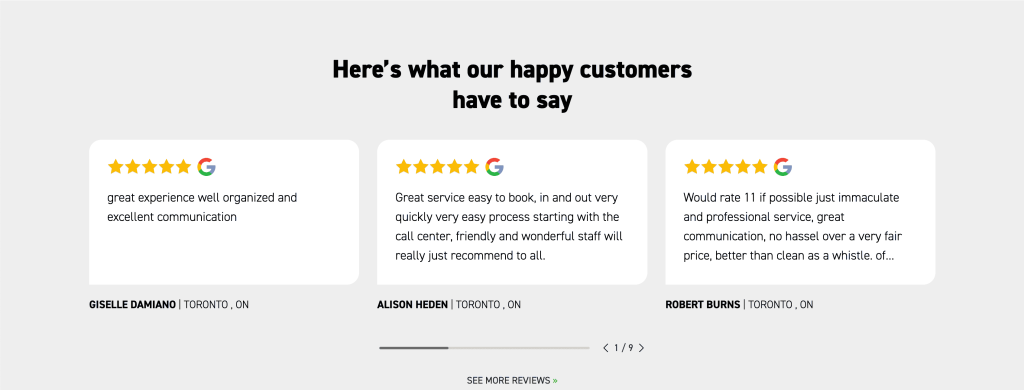
Embedding real-time reviews enhances your reputation and can increase conversion rates. It also serves as a form of social proof, encouraging others to leave feedback to see their experience featured on your website.
16. Use Review Request Templates
Creating pre-written templates for email, SMS, and social media makes it easy to send review requests consistently. These templates should be personalized and include the customer’s name, purchase details, and a direct Google review link.
Using a structured approach ensures a higher response rate and saves time. By automating the request process with ready-to-use templates, businesses can collect more reviews without manual effort, maintaining a steady stream of customer feedback.
17. Offer a Great Customer Experience
Providing an outstanding experience is the most effective way to receive positive Google reviews. When customers are genuinely satisfied, they are more likely to take the time to leave feedback and recommend your business to others.

Focusing on great service, timely communication, and exceeding customer expectations creates a loyal customer base. Happy customers naturally leave glowing reviews, helping improve your online reputation and brand credibility.
18. Include Review Requests in Receipts & Packaging
For businesses that sell products or provide takeout services, adding a Google review request to receipts, invoices, or thank-you notes is a simple yet effective strategy. A printed review link or QR code encourages customers to leave feedback while the experience is still fresh.
Making review requests part of your packaging and checkout process creates a passive yet effective review collection method. Customers who appreciate your product or service will be more likely to leave a positive review when reminded.
19. Respond to All Reviews (Good and Bad)
Engaging with all reviews, whether positive or negative, shows that your business values customer feedback. Thanking customers for positive reviews strengthens relationships, while professionally addressing negative reviews demonstrates your commitment to customer satisfaction.
Timely responses to Google reviews improve trust and brand perception. By actively managing reviews, businesses can turn negative experiences into positive ones, ultimately enhancing customer loyalty.
20. Use Google Ads to Promote Your Reviews
Promoting Google reviews through paid ads can boost visibility and attract more customers. Highlighting your best reviews in Google Ads makes your business stand out and builds instant credibility with potential clients.
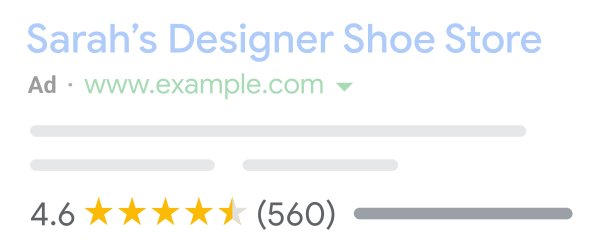
Running targeted ad campaigns featuring customer testimonials helps drive more traffic to your website. These reviews act as powerful social proof, influencing purchasing decisions and increasing conversions.
21. Partner with Local Influencers & Businesses
Collaborating with local influencers or partnering with other businesses helps generate more Google reviews. Influencers can share their experiences, encouraging their audience to leave feedback.
Cross-promotions with complementary businesses can also generate mutual benefits. By featuring each other’s businesses and reviews, both parties gain more exposure and credibility within the community.
22. Add Google Review Requests to Appointment Confirmations & Follow-Ups
Integrating review requests into appointment confirmations and follow-up messages is an effective way to remind customers to leave feedback. A simple “How was your experience?” message followed by a Google review link increases response rates.
Automating this process ensures consistency, helping businesses collect more Google reviews effortlessly. Customers are more likely to engage when asked at the right time.
23. Use a Chatbot to Request Reviews
Automated chatbots can guide customers through the review process by sending personalized reminders. Chatbots integrated into your website, SMS, or messaging apps ensure customers receive a review request immediately after an interaction.
Since chatbots provide instant responses, customers are more likely to leave a Google review when prompted in real time. This automation reduces manual effort and enhances engagement.
24. Track & Improve Your Review Strategy
Monitoring your Google Business Profile analytics helps track the number of reviews you receive and their impact on your online presence. Regularly reviewing this data allows businesses to adjust their strategies for better results.
By identifying trends and adjusting review collection methods, businesses can improve their Google reviews strategy, ensuring they maintain a strong online reputation and attract more customers.
Common Google Review Mistakes to Avoid
Fake Reviews & Black-Hat Tactics (What Can Get You Banned)
Many businesses are tempted to buy fake Google reviews or use other unethical methods to boost their rating. However, Google has strict policies against manipulated reviews, and violating them can result in penalties, review removal, or even account suspension. Instead of taking shortcuts, focus on authentic customer engagement to build a sustainable and trusted reputation.
Generating more Google reviews organically through excellent service, timely requests, and seamless review collection methods like NFC-enabled review cards ensures long-term credibility. Businesses that follow ethical review collection strategies maintain higher rankings and better local SEO without risking their reputation.
Ignoring Negative Reviews (Why It Hurts Your Business)
No business wants negative Google reviews, but ignoring them can damage your reputation even further. Responding professionally to negative feedback shows customers that you care and are willing to improve. Customers often look at how businesses handle complaints, and a thoughtful response can turn a dissatisfied customer into a loyal one.
Engaging with all customer reviews—positive or negative—improves brand trust. Timely, polite, and solution-driven responses demonstrate credibility and encourage potential customers to choose your business over competitors who neglect customer feedback.
Asking for Reviews in the Wrong Way (What Doesn’t Work)
Many businesses fail to get more Google reviews because they ask in a way that feels forced, inconvenient, or transactional. Never offer incentives, discounts, or rewards in exchange for reviews—this violates Google’s policies and can lead to penalties.
Instead, use personalized, natural, and timely requests that align with the customer journey. Automated review follow-ups, NFC technology, and simple direct links make it easier for customers to leave feedback without feeling pressured. Encouraging organic, unbiased reviews leads to stronger engagement and improved Google My Business rankings.
Conclusion & Next Steps
Getting more Google reviews in 2025 requires a strategic, ethical, and customer-centric approach. By making it easy for customers to leave reviews, using direct Google review links, leveraging NFC technology, and automating requests through email and SMS, businesses can boost Google reviews effectively.
Recap of Key Takeaways:
- Claim and optimize your Google Business Profile to improve search visibility.
- Use direct review links, QR codes, and NFC-enabled tools to simplify the review process.
- Automate review requests via email and SMS for consistent engagement.
- Ask at the right moment to capture feedback when customers are most satisfied.
- Respond to all reviews professionally to build trust and credibility.
How to Build a Sustainable Review Collection Strategy
The best way to get Google reviews is to integrate review collection into everyday business operations. Encourage feedback organically by focusing on customer experience, seamless technology integration, and automation. Monitoring Google My Business reviews analytics helps businesses refine their strategy and continuously improve their online reputation.
Get Started: Implement These Tips Today
With more Google reviews, businesses can enhance local SEO, attract more customers, and build trust in competitive industries. Start using review automation tools, NFC review solutions, and personalized engagement strategies to maximize customer feedback and grow your business in 2025.